
Start with the room workflow, not the product family
Neat's current catalogue includes video bars, collaboration boards and companion devices. They can create a consistent user experience, but they solve different physical and operational problems. A bar uses an existing front-of-room display; a board combines display, touch, camera, microphones and loudspeakers; a Pro model adds capacity that only matters when the room can use it.
Document the everyday journeys first: scheduled platform meetings, guest calls, laptop-led BYOD sessions, wired and wireless presentation, whiteboarding, room scheduling and local display use. Then record room depth, seating orientation, acoustic conditions, display size, mounting structure, cable paths and support ownership.
Sinoway's guide to meeting-room compute choices in 2026 explains why an appliance, Windows system or BYOD path should be selected together with the room's management and lifecycle model.
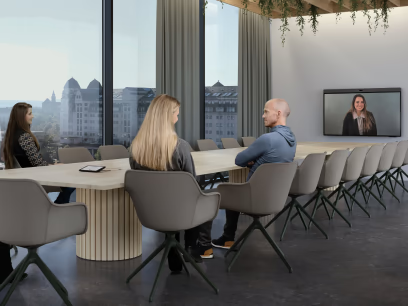
Neat Bar Gen 2: a repeatable everyday-room pattern
Neat positions Bar Generation 2 for everyday meeting rooms. It is a current-generation video bar rather than the original Neat Bar, which reached end of sale for Microsoft Teams in March 2025. That distinction matters when procurement teams compare an old quotation, used stock or a model name without its generation.
Bar Gen 2 can suit small and medium spaces where the chosen display, seating distance and camera position form a predictable pattern. It keeps the camera and audio at the front of the room while a Neat Pad or other supported controller provides the meeting interface. A repeatable standard can simplify deployment, but the integrator must still verify viewing size, display mounting, cable reach, network access and acoustic performance.
Do not select it by an informal room-capacity label alone. A long narrow room, strong backlight, hard surfaces or furniture that places participants far off axis may need a different camera position or system architecture. Test the intended framing and speech pickup in the actual geometry.
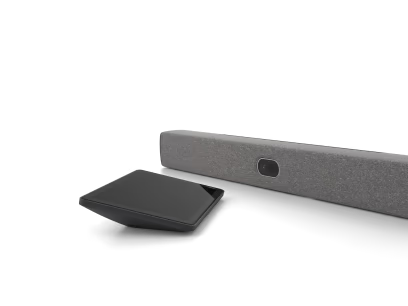
Neat Bar Pro: more reach and display flexibility
Neat Bar Pro is aimed at larger meeting spaces. Neat's current specifications describe a wide and tele camera system, hybrid zoom up to 16x, a 16-microphone beamforming array, three full-range loudspeakers and support for up to three display outputs, although platform-specific limitations apply. These capabilities can help in a deeper room, but they do not replace sightline and acoustic design.
The product page notes that Google Meet and Microsoft Teams do not currently support three-screen operation on Bar Pro, and that multiple-console support also varies by platform. Treat the hardware maximum and the platform-supported configuration as separate facts. Confirm the exact software release, room account and approved topology before promising a layout.
Bar Pro also requires careful physical coordination. Check mounting above or below the display, camera eye line, ventilation, service access, screen count, network ports and the path to the controller. For larger rooms, relate the bar to the seating plan rather than assuming the Pro label guarantees useful close-ups for every participant.
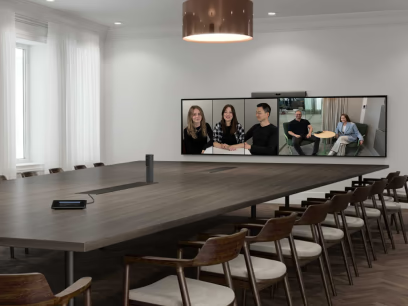
Neat Board: choose integrated touch only when people will use it
Current Neat Board options include Board 32, Board 50 and Board Pro. The integrated display, camera, microphones, loudspeakers and touch surface can reduce the number of visible components and create a direct collaboration experience. Board 32 targets desks and smaller spaces, Board 50 fits many everyday rooms, and Board Pro is positioned for larger groups.
The key question is not whether touch is impressive; it is whether the room workflow needs people to stand at the screen, annotate, whiteboard or manipulate content. If participants mostly join scheduled calls and view presentations, a video bar with a correctly sized display may be more appropriate. If interactive work is frequent, confirm standing space, reach, accessibility, glare, writing height and how remote participants receive the content.
Our guide to all-in-one collaboration boards in Shanghai covers mounting, room conditions, platform mode and support ownership in more detail.
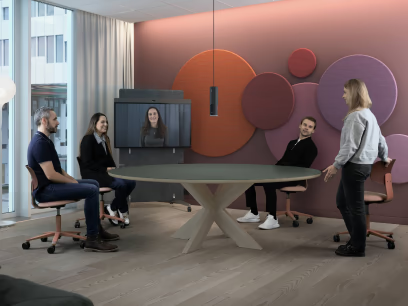
Verify Teams, Zoom, Google Meet and BYOD separately
Platform support changes with model generation, Neat OS, application release and region. As of October 2026, Neat's Google Meet documentation lists official support for Bar Gen 2, Bar Pro, Board 32, Board 50 and Board Pro, with minimum software and licensing requirements. The original Neat Bar and original Neat Board are not on that Google Meet list.
Microsoft Teams Rooms, Zoom Rooms and BYOD capabilities also differ. Neat's current content-sharing matrix shows that supported resolutions and wired or wireless sharing behaviour vary by model and platform. A feature available in BYOD mode is not automatically available in a native room application, and a hardware output does not guarantee that every platform can use it.
Before ordering, capture the exact model, application mode, required meeting features, licences, firmware baseline and content-sharing paths. Recheck the official compatibility and support pages at procurement and commissioning. An AV integrator in China can coordinate this validation with room design and regional support rather than treating it as a product-only decision.
Compare camera and microphone performance in the actual room
Manufacturer specifications help shortlist devices, but coverage is affected by seat distance, room width, ceiling height, reverberation, background noise and the way people face the camera. Use the proposed mount position and real furniture during a pilot. Evaluate wide-room framing, close-ups, movement, interruptions and participants seated at the table ends.
For Bar Pro, test when the wide and tele views change and whether the result supports the meeting style. For a board, test users both seated and standing near the screen. For Bar Gen 2, make sure the display size and camera height do not create an unnatural eye line. Check speech intelligibility from every occupied seat, not only whether a microphone detects sound.
In rooms beyond the intended pattern, consider whether a professional camera, microphone or loudspeaker design is more appropriate. Sinoway's guide to camera and microphone design for medium and large rooms explains why useful coverage is an engineering outcome rather than a distance claim.
Plan the network, licences and management before installation
Coordinate DHCP or static addressing, DNS, NTP, proxy rules, firewall destinations, quality of service, certificates, wireless policy and remote-management access with IT. Keep room accounts separate from device-management roles and apply least privilege. Confirm that the network path is ready before installers arrive; otherwise commissioning becomes a sequence of avoidable workarounds.
Licensing follows the selected platform. For example, Google Meet hardware licensing, Microsoft Teams Rooms licensing and Zoom Rooms licensing have different administration and feature implications. Neat Pulse adds fleet management and support options, but the organisation must define who enrols devices, approves updates, receives alerts and owns vendor escalation.
Create pilot and production update groups. Test camera, microphone, displays, touch, content sharing, guest join and recovery after restart before broad deployment. Record the known-good software baseline and the business reason for delaying or approving a release.
Treat lifecycle status as part of the comparison
The original Neat Bar and original Neat Board have published end-of-sale and end-of-support dates that differ by platform. Neat's October 2026 notice lists Microsoft Teams support for those original models through 3 September 2027, while Zoom and BYOD/Neat Open timelines differ. A product that still works is not the same as a current standard for new deployment.
For new rooms, compare current-generation models. For existing fleets, record model generation, platform mode, purchase date, support end, spare availability and planned replacement window. Do not mix original and Gen 2 devices in one standard without documenting feature and lifecycle differences.
At handover, provide asset records, mounting details, network configuration, room account ownership, licence assignments, firmware baseline, test results, user instructions and recovery steps. A successful choice is one that remains supportable after the launch meeting.