
Why AV configuration recovery needs its own plan
Modern rooms depend on software as much as hardware. A failed DSP, control processor, conferencing appliance or network switch may be replaceable, yet the room can remain unusable if the approved program, device settings, licences or credentials cannot be recovered.
The risk usually appears after a firmware update, hardware swap, supplier change or urgent service call. A file exists, but nobody knows whether it is editable source, a compiled deployment, an old draft or a device export. An AV integrator in China should define the recovery package and test evidence before handover, while the working system and project team are still available.
Separate the different layers of an AV backup
The word backup is too broad for a technical handover. Treat each layer as a separate deliverable with a purpose, owner and restore method. The package may include editable DSP or control source, the compiled program loaded to a processor, system-level settings, device presets, room templates, network parameters, certificates, media files and licence records.
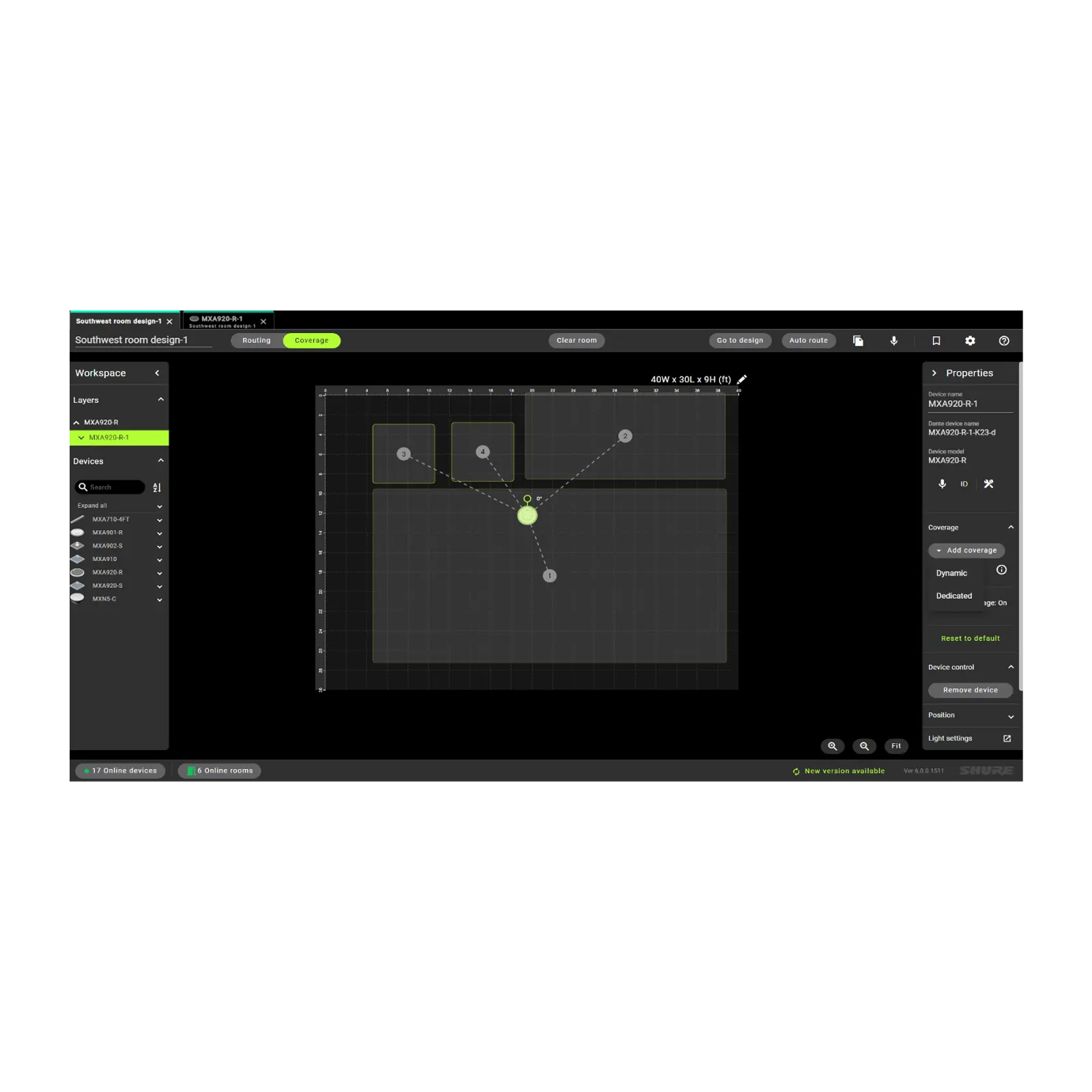
One vendor archive rarely contains everything. Current Q-SYS documentation, for example, distinguishes encrypted Core configuration backups from design files, feature licences and user-managed media, which must be handled separately. Shure Designer room files can preserve devices, routing and settings, while individual presets have their own scope. The manifest must describe what each file contains rather than assuming its filename is self-explanatory.
- Editable source used to modify and recompile the system.
- Accepted deployed or compiled program and its target processor slot.
- Device configuration exports, presets and room templates.
- Licences, certificates, media, fonts, drivers and third-party modules.
- Network, identity and cloud dependencies needed for recovery.

Build a room-by-room recovery manifest
Create one manifest that connects every room and device identifier to its accepted files. Record site, building, floor, room, asset name, model, serial number, network identity, software or firmware version, file name, checksum, storage location, backup date and responsible person. Use the same stable identifiers found on drawings, labels, service tickets and monitoring portals.
The manifest should state whether a file was only collected, successfully opened, compiled, loaded to test hardware or proven in a full restore. Those are different levels of evidence. Note deliberate exclusions and their consequences; a missing editable source file may not stop today's room, but it can prevent a future change or hardware migration.
Record software, firmware and hardware compatibility
A configuration is usable only with the correct toolchain and target hardware. Record the authoring application, exact version, required modules or plug-ins, processor model, firmware baseline and any upgrade path needed to open older files. Keep installation media or approved download references where licensing and organisational policy allow.
Do not assume the newest software can safely open, convert and redeploy every historical project. Shure documents conversion paths for earlier Designer project formats, and Q-SYS separates Core settings from Designer files and licence backups. Biamp recommends saving the running Tesira configuration before firmware work. Validate the specific combination used on the project instead of relying on a generic vendor name.

Version programs without confusing source and deployment
Keep one signed-off baseline and preserve later changes as new versions with meaningful notes. A good change record identifies the request, author, date, affected rooms, source version, deployed version, test result and rollback option. Never overwrite the only accepted file with an untested edit.
Cloud libraries can help distribute deployed programs, but they do not automatically prove that editable source and every dependency are available. Crestron's current XiO Cloud documentation, for example, supports uploaded program versions and retains earlier versions in its program table unless they are deleted. The project still needs to identify which source produced each deployment and who may modify it.
Protect credentials, certificates and China network dependencies
Do not place passwords, recovery passphrases or private keys inside a shared drawing set. Store secrets in the organisation's approved credential vault and reference the access procedure in the manifest. Use named, role-based administrator accounts where supported, record certificate renewal ownership and remove supplier access promptly when responsibilities change.
For cloud-managed systems in China, test the real office network path rather than assuming overseas access will behave identically. Confirm DNS, proxy, firewall, certificate inspection, time synchronisation and required outbound destinations with IT and the platform provider. Also document an offline or local recovery path where the product supports one.
Prove recovery during commissioning
A backup is not verified until an authorised technician can use it. Plan the restore test on spare, laboratory or representative hardware where possible. If production equipment must be used, schedule a maintenance window, obtain approval and protect current files before beginning. Some restores overwrite settings, stop running programs or reboot processors.
Open and validate editable files, check required modules, compile where applicable, load the accepted program, restore settings and licences through their supported workflows, then test the complete room journey. Confirm audio, video, control, conferencing, network communication, presets, monitoring and restart behaviour. Record anything not tested rather than calling the package complete.
Include the recovery evidence in the AV commissioning checklist for China offices. The result should show the test date, hardware, software versions, files used, responsible technician, measured outcome and any remaining dependency.
- Verify file integrity and checksums before the maintenance window.
- Confirm the restore target and compatible hardware model.
- Protect the current working state before applying a backup.
- Test user workflows, not only a successful upload message.
- Return the room to its accepted baseline and update the manifest.
Assign custody and update responsibility after handover
Store the owner's recovery package in an access-controlled repository with resilient backup and retention. Identify who may read, change, approve and restore each system. Keep operational guides accessible to support teams while restricting sensitive technical files and credentials to authorised roles.
Update the repository after every approved move, add, replacement, firmware change or programming revision. Align file names and asset identifiers with the AV rack labelling and documentation guide so another technician can locate the correct room and hardware without guesswork. Recovery ownership should survive staff turnover, supplier changes and the eventual replacement of the original processor.